

Workzone Product Tour
Purpose-built for Marketing, Creative and Operations teams.
Workload Reports
Workzone automatically calculates planned work hours across projects by person, team, or workgroup so managers can quickly identify who is overbooked, underutilized, or at risk of burnout.
Workload Reports help teams balance resources, adjust timelines, and improve project planning before deadlines slip. Reports can be customized, filtered, exported to Excel, or saved as PDFs for leadership reviews and capacity planning discussions.
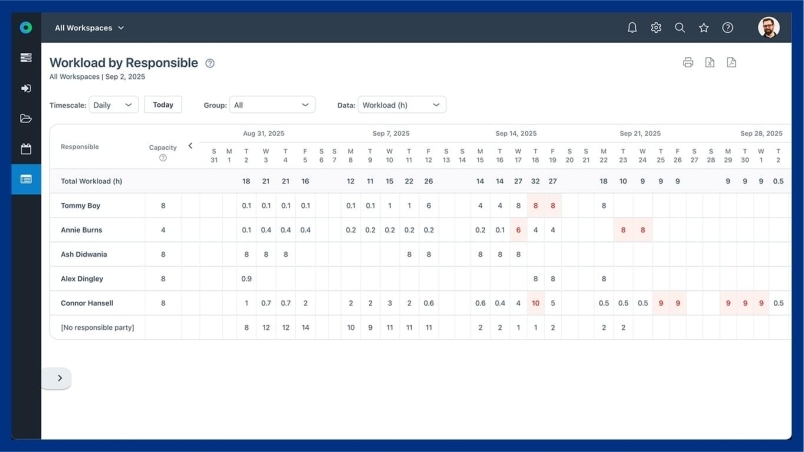
Finally... see everything in one place
What are Workload Reports?
Workload Reports give managers visibility into how work is distributed across people and teams over specific time periods.
The report helps identify employees who may be overloaded, underutilized, or assigned conflicting priorities. For example, if a team member has 65 hours assigned during a 40-hour work week, managers can quickly spot the issue and rebalance work before projects fall behind.
Workload Reports also help uncover projects with unrealistic timelines, inaccurate effort estimates, or resource gaps that could impact delivery.
Why are Workload Reports important?
Over and Without visibility into team capacity, projects can quickly become delayed, employees can burn out, and priorities can become misaligned.
Workload Reports help organizations improve resource planning, balance assignments across teams, and make smarter staffing decisions based on real project demand. Managers can proactively adjust workloads, shift deadlines, or reassign work before issues impact delivery quality or team morale.
Balanced workloads lead to better project outcomes, healthier teams, and more predictable delivery timelines.
Who uses Workload Reports?
Workload Reports are used by project managers, operations leaders, marketing teams, PMOs, agency leaders, and department managers who need visibility into team capacity and resource allocation.
They are especially valuable for organizations managing multiple projects simultaneously and needing to forecast workloads, plan staffing, and keep projects on track.
What is a workload report in project management?
A workload report shows how work hours are distributed across employees or teams over a specific time period. It helps managers identify overallocated or underutilized resources and balance workloads more effectively.
How do workload reports help resource planning?
Workload Reports provide visibility into team capacity, assigned hours, and project demand so managers can make informed staffing and scheduling decisions.
Can Workzone identify overloaded team members?
Yes. Workzone highlights employees or teams with more assigned work than available capacity, helping managers rebalance workloads before deadlines are impacted.
Can workload reports help prevent employee burnout?
Yes. By identifying employees with excessive workloads, managers can redistribute assignments, adjust timelines, and improve overall workload balance.
Who should use workload reports?
Project managers, operations teams, marketing teams, PMOs, agencies, and department leaders use workload reports to manage capacity, forecast resources, and improve project delivery.
Ready To See Workzone In Action?
Simple project management software with real people ready to help you get started.

