

Project management software for nonprofits
Do More Good. With Less Project Chaos.
24+ years helping nonprofit teams manage programs, fundraising, and org-wide initiatives with a system everyone from volunteers to staff and board members can pick up in minutes.
BUILT
FOR
- Programs
- Development
- Marketing
- Operations
- IT
- Leadership & Board
- Cross-functional Teams
Across
- Nonprofits
- Foundations
- Religious Institutions
TRUSTED BY LEADING NONPROFITS, FOUNDATIONS & RELIGIOUS INSTITUTIONS


Workzone is our Bible. We have all of our projects entered. And that's how we manage our processes. It really is kind of our brain. And I've warned people that if it's not in Workzone, I won't remember.

Angie Moore
Cassia
Nonprofit realities as the starting point
Our thesis for nonprofit project management
| The Nonprofit Reality | The Workzone Approach |
|---|---|
| Your mission keeps growing. Your team doesn't. | See workload and capacity before taking on more work |
| Requests disappear into email and hallway conversations | Give incoming work one front door with customizable forms |
| Programs, fundraising and campaigns rely on cross-team handoffs | Connect every owner and deadline in one shared plan |
| Recurring events and campaigns mean rebuilding the same plans | Reuse proven workflows with project templates |
| Leadership needs clarity without chasing status updates | Make progress visible with dashboards and automated reports |
The structure nonprofit teams require. The simplicity business teams need. The support to make it stick
CORE CAPABILITIES
Manage nonprofit work in one simple place.
Your mission keeps growing. Your team doesn't. Workzone helps you manage more programs, campaigns, and priorities without adding more complexity.
01 PROJECTS
Track Every Nonprofit Project
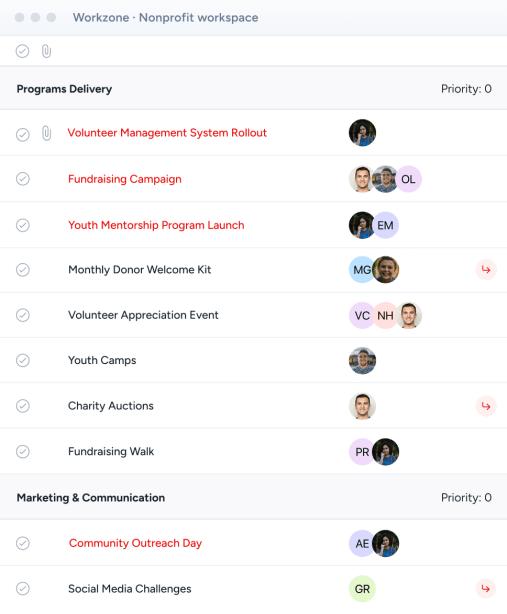
Track programs, annual galas, and grant deadlines in one shared view.

02 REQUESTS
Centralize Project Intake
Give programs, development, and external partners a single front door for requests.
03 APPROVALS
Speed Up Reviews & Approvals
Route donor appeals, grant proposals, and marketing collateral without email bottlenecks.
04 COORDINATION
Coordinate Across Teams & Programs
Keep Programs, Development, Operations, and Leadership aligned across every handoff.
05 WORKLOAD
Balance Team Workloads
See actual staff and volunteer bandwidth across competing initiatives before burnout occurs.
06 TEMPLATES
Standardize Repeatable Workflows
Turn annual galas, fundraising appeals, and grant cycles into reusable blueprints.
07 REPORTING
Give Leadership Clear Visibility
Give executive directors, board members, and funders instant visibility into progress and impact.
THE NONPROFIT VETTING CHECKLIST

1-on-1 training & under-10-min response time
Volunteers, board & guest reviewers join free
Independently audited annually; reports available
Seamless SAML login with Entra ID & Google
SUPERCHARGE PROJECT MANAGEMENT
Make the most out of Workzone
Connect the tools your teams already use, and let AI handle the busywork without adding complexity.
INTEGRATIONS MADE SIMPLE
9000+ tools. Fully managed.
Connect Workzone to the tools your team already uses, like Email, Slack, Teams, Google Drive, QuickBooks, and more. Tell us what else you use, and our team will take it from there.
1
You tell us where work gets stuck
Share the tools you use and where things slow down.
2
Our team builds and tests it for you
Workzone owns the setup from start to finish.
3
We monitor and maintain it, forever
Real people keep it running as your tools evolve.
- Everything is managed in-house. No third-party vendors or outsourcing.

AI Made Simple
Just ask. Workzone does the admin.
Thoughtful AI tools that save time and reduce busywork, with your people keeping the judgment.


How we build it

No third-party AI providers.
SOC 2 audited.
No surprise bills as usage grows.
Admins and users switch it on or off.


ADAPTS TO EVERY NONPROFIT TEAM
Flexible for every team.
Standardized organization-wide.
No two nonprofit teams work the same way. Workzone gives each team the flexibility to manage their work while standardizing visibility, accountability, and execution across the organization.
WORKZONE FOR PROGRAMS
More Mission. Less Coordination Chaos.
Keep program launches, community initiatives and ongoing delivery connected with clear ownership and shared visibility.

WORKZONE FOR DEVELOPMENT
Every Fundraising Effort. Moving Together.
Coordinate fundraising campaigns, donor communications and events with a shared plan that keeps every handoff visible.
WORKZONE FOR MARKETING
From Campaign Brief To Community Impact.
Manage campaigns, creative production and mission storytelling without losing requests, feedback or deadlines in email.
WORKZONE FOR OPERATIONS
Keep The Organization Running In Unison.
Connect operational improvements, recurring work and cross-functional initiatives without adding another heavyweight system.
WORKZONE FOR LEADERSHIP & BOARD
A Clear View. Without Another Status Meeting.
Keep strategic initiatives and board reporting connected to the work, so leaders can see progress and focus attention where it matters.
WORKZONE FOR IT & HR
Support The People Behind Your Mission.
Keep systems projects, onboarding and training organized while business teams stay connected to each rollout.
Proof of impact
What transformation looks like.
87%
The V Foundation for Cancer Research completed 87% more projects year over year with the same team.
The V Foundation for Cancer Research
10–15 hrs
BCU freed up 10–15 hours per team member per week by centralizing requests, projects, approvals and deadlines.
BCU
2
Texas State Technical College used workload data to justify hiring 2 additional team members and prevent burnout.
Texas State Technical College
~80%
MercyHealth builds approximately 80% of project plans from templates, eliminating the need to reinvent the wheel.
MercyHealth
1%
Ebenezer saw only 1% of tasks delayed by over 30 days despite working on 1,300+ projects a year.
Ebenezer
One
IASLC created a single source of truth across Programs, Operations, Marketing, Exec, IT and Membership.
IASLC
The value of time back
ROI for a 56-person nonprofit team.
Workzone's illustrative scenario for 54 team members and 2 managers estimates 4,485 hours saved per year by eliminating manual efforts. Results depend on your team and workflows.
Total dollar impact
Workzone investment
Return on investment
A human, in under 10 minutes
Here for the question behind the question
HUMAN SUPPORT THAT IS REFRESHINGLY ABUNDANT (SORRY BOTS)
Software alone doesn’t create adoption. People do.
We listen first, speak candidly, and shape Workzone around how your team really works. Then we stay with you after launch, helping people build confidence and keep improving.


3 to 4 weeks
Average time to go live, fully trained
Under 10 minutes
Response from a human who has all the context
Unlimited
Training and ongoing support
1 on 1
Project management coaching
See why nonprofits
& foundations trust Workzone.

Personalized support that makes the difference.
“We've done one-on-one training, we've had questions answered right away, we've even had conversations with their product team about how we want to use the platform. The level of personalized support we receive has made all the difference.”
IASLCRead Story

Structure that grows with the team.
“Workzone was different. It was user-friendly enough to dive right in, but more importantly, it wasn't a one-size-fits-all platform. It gave us the support we needed to tailor it to our workflows.”
University of Oklahoma FoundationRead Story

Make the work visible across the system.
“Workzone has allowed us to show the work that we're doing for each hospital and the system as a whole. We've made huge strides and it's clicking for these team members. They now realize, ‘I want my work to show up on a report so the hospital president knows I'm working hard for them.’”
Legacy HealthRead Story

Deadlines don't get missed.
“The platform blends project management, task workflows, project communication, and cost tracking in one place. To put it plainly, deadlines don't get missed when they're in Workzone.”
Presbyterian Senior Living

A lifesaver for project management.
“Workzone is a lifesaver for project management and vital to our work processes. The software is constantly improving based on feedback, so we know we are always getting the best product available.”
Senior Housing Partners
YOUR TEAM’S WORK MATTERS
Ready to see Workzone in action?
Simple project management software with real people ready to help you get started.

