

Workzone Product Tour
Purpose-built for Marketing, Creative and Operations teams.
Advanced Markup
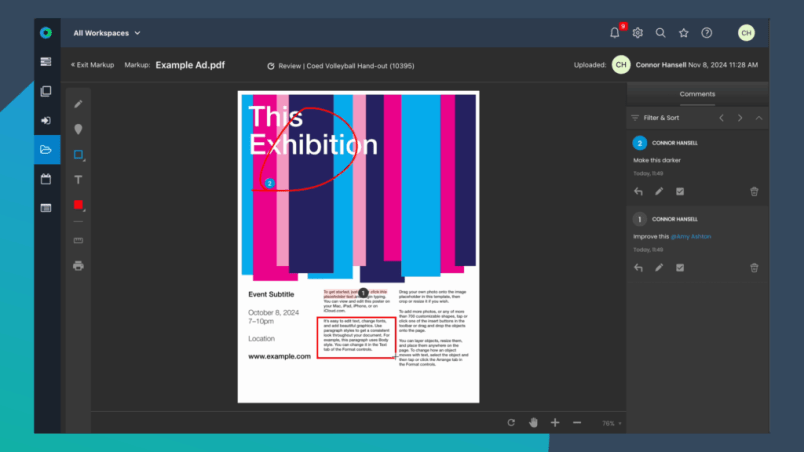
Workzone’s built-in markup and online proofing tools make reviewing and approving creative work faster, clearer, and easier to manage. Teams can annotate images, PDFs, videos, and other files directly within Workzone by highlighting specific areas and leaving contextual feedback tied to the exact file version.
Instead of chasing feedback across email threads, screenshots, or disconnected tools, all comments, approvals, and revisions stay centralized within the project workflow for better visibility and accountability.
Reviewers can use arrows, shapes, highlights, text comments, and callouts to give precise feedback so designers, marketers, and content creators know exactly what needs to change. Multiple reviewers can collaborate on the same file simultaneously, helping teams speed up review cycles and reduce approval delays.
External stakeholders can also review, markup, and approve shared files without needing a Workzone login, making collaboration with clients, vendors, leadership teams, and outside partners simple and frictionless.
From first draft to final approval, Advanced Markup helps teams streamline creative reviews, improve collaboration, and keep projects moving forward.
Finally... see everything in one place
What is Advanced Markup?
Advanced Markup is Workzone’s built-in online proofing and file annotation tool that allows teams to review, comment on, and mark up files directly within projects. Teams can collaborate on PDFs, images, videos, and other supported file types without switching between multiple tools.
What file types support Advanced Markup?
Workzone supports markup for PDFs, images, SVG files, TIFF files, and MP4 video files. Additional file support continues to expand over time.
Can teams mark up videos in Workzone?
Yes. Teams can leave comments and feedback directly on videos during the review process, helping creative and marketing teams streamline video approvals and revisions.
What markup tools are included?
Advanced Markup includes annotation tools such as arrows, shapes, freehand drawing, highlights, notes, comments, callouts, and text markup tools for supported file types.
Can multiple reviewers collaborate on the same file?
Yes. Multiple reviewers can review and annotate files simultaneously, allowing teams to centralize feedback and speed up approval cycles.
Can external users review and mark up files?
Yes. External reviewers can access files through secure approval links and use Advanced Markup tools without needing a Workzone login.
Can reviewers tag or notify team members in comments?
es. Internal users can @mention other users directly within markup comments to trigger notifications and improve collaboration during reviews.
Why use online proofing instead of email feedback?
Online proofing centralizes comments, annotations, approvals, and revisions directly on the file itself. This reduces version confusion, eliminates scattered email feedback, and helps teams move projects through approvals faster.
Who uses Advanced Markup?
Advanced Markup is commonly used by marketing teams, creative teams, agencies, operations groups, PMOs, and organizations managing collaborative reviews and approval workflows across multiple stakeholders.
How does Advanced Markup improve project collaboration?
Advanced Markup keeps feedback, approvals, and file revisions connected directly to project work so teams can improve visibility, reduce review delays, and simplify collaboration across internal and external stakeholders.
Ready To See Workzone In Action?
Simple project management software with real people ready to help you get started.

