

Project management software for agencies
Where Creatives and Operations Finally Agree.
24+ years helping agencies manage every client, campaign, approval, and resource in one place, with a system everyone from creatives to ops can pick up in minutes.
BUILT
FOR
- Accounts
- Creative
- Production
- PMO
- Traffic & Ops
- Resourcing
- IT
- Finance
- Leadership
Across
- Marketing
- Creative
- Digital
- Advertising
- PR & Comms
- In-house Agencies
TRUSTED BY THE WORLD’S TOP MARKETING & CREATIVE AGENCIES


With Workzone, we didn’t have to hack the tool, it was ready to go, right out of the box. We operate in an ecosystem model, teams that work across groups of clients, almost like agencies within the agency. Workzone’s portfolio structure mirrors that exactly.

Andrea Spatz
Bader Rutter
Agency realities as the starting point
Our thesis for agency project management
| The Agency Reality | The Workzone Approach |
|---|---|
| Client work is scattered across tools and inboxes | See every client and project in one portfolio view |
| Client feedback gets lost in email chains | Clients mark up and approve with free reviewer access |
| Overruns surface after margins are gone | Track time against budget in real time |
| Teams rebuild campaign plans from scratch | Launch campaigns with reusable templates |
| Creatives resist complex PM software | Built for non-PMs with zero learning curve |
The structure agencies require. The simplicity business teams need. The support to make it stick
CORE CAPABILITIES
Manage agency work in one simple place.
Keep clients, campaigns, approvals, and resources connected. Workzone helps you deliver more client work with the team you have without adding more complexity.
01 PROJECTS
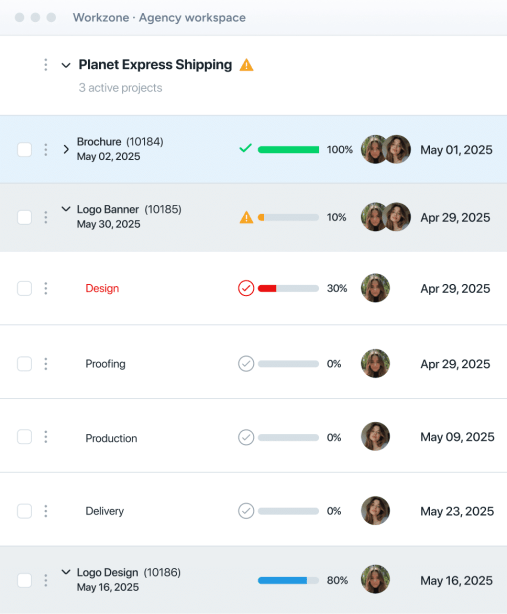
See Every Client & Project
See your entire client portfolio in one screen, then drill down to every task.

02 REQUESTS
Centralize Client Requests
Give clients and account teams one front door for new projects and briefs.
03 APPROVALS
Move Creative to Approval Faster
Collect client markups on docs, images and video without email threads.
04 COLLABORATION
Collaborate With Clients & Teams
Keep creatives, account teams and clients aligned on status, feedback and handoffs.
05 RESOURCES
Balance Workloads & Protect Margins
Allocate people, prevent burnout and track time against budget in one place.
06 TEMPLATES
Template Repeatable Campaigns
Turn recurring campaign types into reusable workflows your team can launch in minutes.
07 REPORTING
Report on Profitability
Give leadership ready-made reports on revenue, profitability and actual vs. budget.
THE AGENCY VETTING CHECKLIST

1-on-1 training & under-10-min response time
Clients & guest reviewers join free
Clients see only their own projects
Every client sign-off on record
Independently audited annually; reports available
Seamless SAML login with Entra ID & Google
SUPERCHARGE PROJECT MANAGEMENT
Make the most out of Workzone
Connect the tools your teams already use, and let AI handle the busywork without adding complexity.
INTEGRATIONS MADE SIMPLE
9000+ tools. Fully managed.
Connect Workzone to the tools your team already uses, like Email, Slack, Teams, Google Drive, QuickBooks, and more. Tell us what else you use, and our team will take it from there.
1
You tell us where work gets stuck
Share the tools you use and where things slow down.
2
Our team builds and tests it for you
Workzone owns the setup from start to finish.
3
We monitor and maintain it, forever
Real people keep it running as your tools evolve.
- Everything is managed in-house. No third-party vendors or outsourcing.

AI Made Simple
Just ask. Workzone does the admin.
Thoughtful AI tools that save time and reduce busywork, with your people keeping the judgment.


How we build it

No third-party AI providers.
SOC 2 audited.
No surprise bills as usage grows.
Admins and users switch it on or off.


ADAPTS TO EVERY AGENCY TEAM
Flexible for every team.
Standardized organization-wide.
No two agency teams work the same way. Workzone gives each team the flexibility to manage their work while standardizing visibility, accountability, and execution across the organization.
WORKZONE FOR ACCOUNT MANAGEMENT
Every Client. One Clear View.
Keep client status, feedback and approvals in one place so account teams spend less time chasing updates.

WORKZONE FOR CREATIVE
From Request To Approved, Faster.
Move creative from brief through production and proofing with fewer handoffs and less waiting on feedback.
WORKZONE FOR OPERATIONS
Run The Agency, Not The Spreadsheets.
Standardize workflows, track time and keep budgets visible as you add clients, projects and teams.
WORKZONE FOR RESOURCE MANAGEMENT
The Right People On The Right Work.
See capacity across every client and campaign, then rebalance before deadlines or people burn out.
WORKZONE FOR FINANCE
Know Where Every Hour Goes.
Connect time, billing, budgets and expenses so finance sees profitability by client and project.
WORKZONE FOR STRATEGY & MEDIA
Plans That Launch On Schedule.
Coordinate research, media plans and launch timing with clear owners and dependencies across teams.
WORKZONE FOR LEADERSHIP
One Portfolio. Healthy Margins.
Give leadership a live view of client work, utilization and profitability without chasing reports.
A human, in under 10 minutes
Here for the question behind the question
HUMAN SUPPORT THAT IS REFRESHINGLY ABUNDANT (SORRY BOTS)
Software alone doesn’t create adoption. People do.
We listen first, speak candidly, and shape Workzone around how your team really works. Then we stay with you after launch, helping people build confidence and keep improving.

3 to 4 weeks
Average time to go live, fully trained
Under 10 minutes
Response from a human who has all the context
Unlimited
Training and ongoing support
1 on 1
Project management coaching
See why agencies trust Workzone.
The relationship made the difference.
“Most platforms offer similar functionality. But what set Workzone apart was the relationship. Their openness to listen, their willingness to have real conversations, and the responsiveness of their support team, that’s what made the difference.”
Bader RutterRead Story
A partner that listens.
“Great product, but most importantly, the ease it is to work with the Workzone team. They are a partner that listens to their customers and addresses their needs.”
Good Giant
A great return on your investment.
“It’s a great return on your investment. If you’re on the fence, don’t hesitate, jump! It will help you build the communication of your team and streamline your entire company. We meet with our CSM quarterly; there have been several things we’ve requested as new features and they’ve taken them into consideration and implemented many of them.”
Ramsey Mediaworks
Freedom to build better processes.
“Customization has given our team the freedom to create more effective internal processes and Gantt charts have revolutionized our Account Management touchpoints with clients.”
Reveille
YOUR TEAM’S WORK MATTERS
Ready to see Workzone in action?
Simple project management software with real people ready to help you get started.

